Linux (Ubuntu / Debian)
sudo apt install build-essential cmake git \
    libvulkan-dev libglfw3-dev glslang-tools
For headless builds, you can omit libglfw3-dev and configure with -DSPECTRA_USE_GLFW=OFF -DSPECTRA_USE_IMGUI=OFF.
From zero to GPU-accelerated plots in under five minutes — C++ and Python.
| Dependency | Required | Notes |
|---|---|---|
| C++20 compiler | Yes | GCC 12+, Clang 15+, or MSVC 2022+ |
| CMake 3.20+ | Yes | Build system |
| Vulkan runtime / drivers | Yes | Required to run Spectra binaries; usually installed with graphics drivers |
| Vulkan development files | Source builds only | libvulkan-dev on Linux, Vulkan SDK on Windows, vulkan-headers + vulkan-loader on macOS |
| glslangValidator | Source builds only | glslang-tools on Linux, glslang on macOS |
| Python 3.9+ | Optional | For the Python API |
sudo apt install build-essential cmake git \
libvulkan-dev libglfw3-dev glslang-toolsFor headless builds, you can omit libglfw3-dev and configure with -DSPECTRA_USE_GLFW=OFF -DSPECTRA_USE_IMGUI=OFF.
xcode-select --install
brew install cmake vulkan-headers \
vulkan-loader glslang molten-vkgit clone https://github.com/danlil240/Spectra.git
cd Spectra
cmake -B build -DCMAKE_BUILD_TYPE=Release
cmake --build build -j$(nproc)glslangValidator for source builds. GLFW is optional as a system package and is fetched automatically if missing.| Command | Description |
|---|---|
make build | Configure + build (Release) |
make test | Build + run tests |
make install | Install to /usr/local |
make package | Create .deb/.rpm/.tar.gz via CPack |
make clean | Remove build directory |
make format | Run clang-format |
cmake -B build \
    -DCMAKE_BUILD_TYPE=Release \
    -DSPECTRA_BUILD_TESTS=ON \
    -DSPECTRA_BUILD_EXAMPLES=ON \
    -DSPECTRA_BUILD_GOLDEN_TESTS=ON \
-DSPECTRA_USE_FFMPEG=ON| Feature | CMake Flag |
|---|---|
| Video export (MP4) | -DSPECTRA_USE_FFMPEG=ON (requires ffmpeg in PATH) |
| Eigen support | -DSPECTRA_USE_EIGEN=ON |
| Build tests | -DSPECTRA_BUILD_TESTS=ON |
| Build examples | -DSPECTRA_BUILD_EXAMPLES=ON |
| Golden image tests | -DSPECTRA_BUILD_GOLDEN_TESTS=ON |
| ROS2 adapter | -DSPECTRA_USE_ROS2=ON |
| ROS2 bag support | -DSPECTRA_ROS2_BAG=ON |
| Target | Description |
|---|---|
spectra | Core library (static) |
spectra-backend | Multiproc daemon (IPC server) |
spectra-window | Multiproc window agent |
spectra-ros | ROS2 adapter (requires SPECTRA_USE_ROS2) |
examples/* | All example programs |
unit_test_* | Individual unit test executables |
#include <spectra/easy.hpp>

int main() {
    spectra::plot({0.f, 1.f, 2.f, 3.f, 4.f},
                  {0.f, 1.f, 0.5f, 1.5f, 2.f}, "c-o");
    spectra::title("First Spectra Plot");
    spectra::show();
}
Or use the full object API for maximum control:
#include <spectra/spectra.hpp>

int main() {
    spectra::App app;
    auto& fig = app.figure({.width = 1280, .height = 720});
    auto& ax  = fig.subplot(1, 1, 1);

    ax.line(x, y).label("signal").color(spectra::rgb(0.2f, 0.8f, 1.0f));
    ax.title("Sensor Data");
    ax.xlabel("Time (s)");
    ax.ylabel("Amplitude");

    fig.show();
}# Linux / macOS
./build/examples/basic_line
./build/examples/easy_api_demo
./build/examples/demo_3d
# Windows
.\build\examples\Release\basic_line.exe# Install
pip install spectra-plot
# Or development install from source
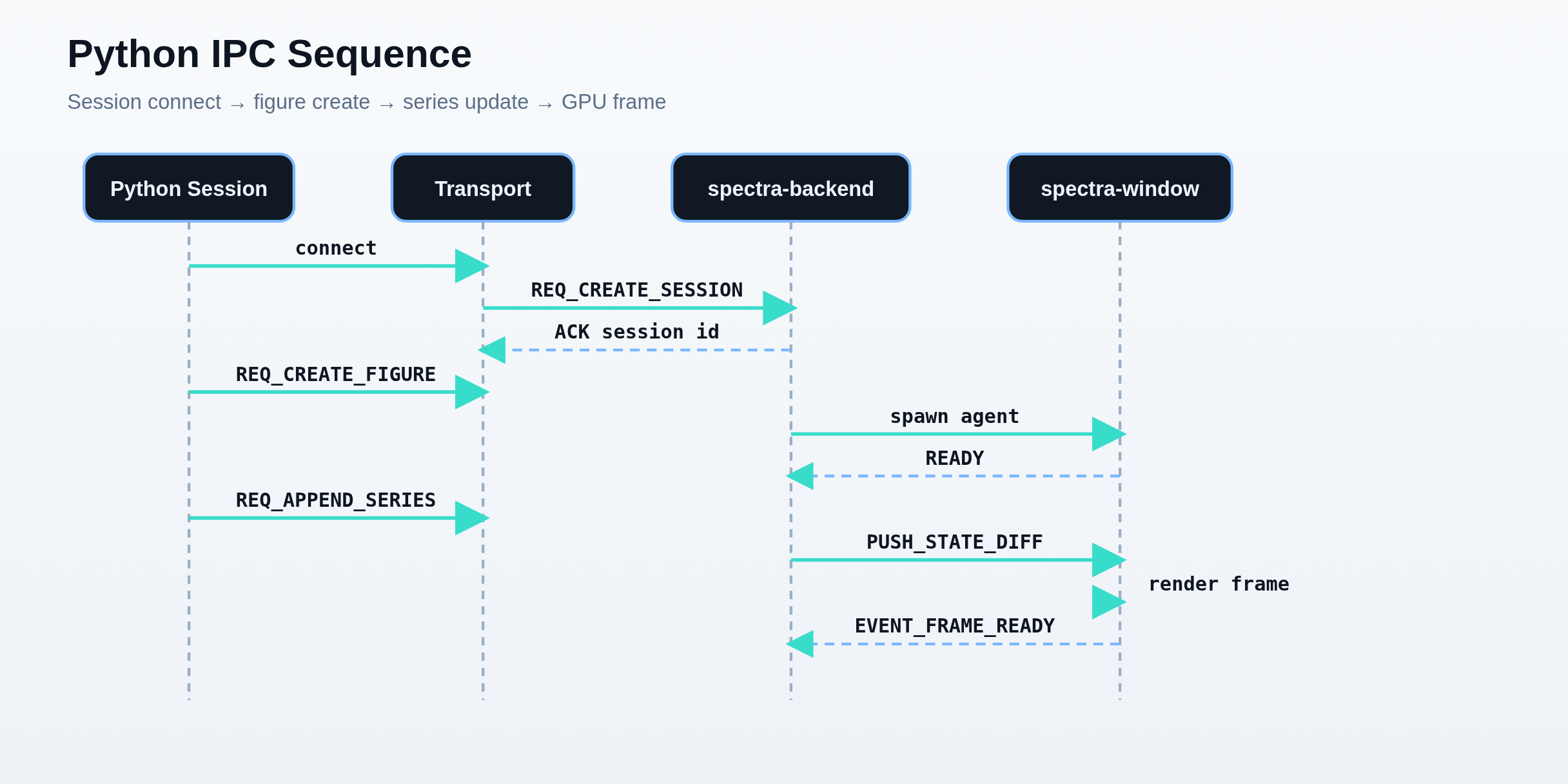
cd python && pip install -e ".[dev]"The Python package (spectra-plot) communicates with the spectra-backend daemon over Unix sockets. The backend is auto-launched on first connection.
Session lifecycle from socket connect through figure creation, series updates, and GPU render.
import spectra as sp
sp.plot([1, 4, 9, 16, 25])
sp.show()-DSPECTRA_BUILD_EMBED_SHARED=ON.Spectra accepts Eigen vectors directly — no conversions needed. Build with -DSPECTRA_USE_EIGEN=ON (requires Eigen3 headers).
#include <spectra/eigen_easy.hpp>

Eigen::VectorXf x = Eigen::VectorXf::LinSpaced(100, 0, 2 * M_PI);
Eigen::VectorXf y = x.array().sin();

spectra::plot(x, y, "r--o");  // zero-copy, direct Eigen support
spectra::show();After installing Spectra (cmake --install build), use it from your project:
find_package(spectra 0.1 REQUIRED)
target_link_libraries(myapp PRIVATE spectra::spectra)The recommended Linux install — adds the Spectra repo so apt handles updates automatically:
# Import the signing key
curl -fsSL https://danlil240.github.io/Spectra/apt/spectra-archive-keyring.asc \
  | sudo gpg --dearmor -o /etc/apt/keyrings/spectra.gpg

# Add the repository (auto-detects your Ubuntu codename)
echo "deb [signed-by=/etc/apt/keyrings/spectra.gpg] https://danlil240.github.io/Spectra/apt $(lsb_release -cs) main" \
  | sudo tee /etc/apt/sources.list.d/spectra.list

# Install
sudo apt update
sudo apt install spectra$(lsb_release -cs) command auto-detects the correct one.cmake -B build -DCMAKE_BUILD_TYPE=Release
cmake --build build -j$(nproc)
sudo cmake --install build --prefix /usr/localThis installs headers to include/spectra/, libraries to lib/, binaries (spectra-backend, spectra-window) to bin/, and fonts/icons to share/spectra/.
| Artifact | How to install | What the user must install manually first |
|---|---|---|
| Debian package | sudo apt install ./spectra_<version>_amd64.deb | Nothing in the common case. Do not preinstall -dev packages; apt resolves runtime dependencies. |
| AppImage | Run the downloaded .AppImage | Usually nothing beyond a working Vulkan-capable driver/runtime. |
| Python wheel | pip install spectra-plot | No compiler, CMake, or Vulkan SDK. A working Vulkan runtime/driver is still required to run the backend. |
| Source build | Build from the repository | libvulkan-dev and glslang-tools on Linux, plus optional libglfw3-dev for system GLFW. |
| Format | Command | Output |
|---|---|---|
| Debian | cpack -G DEB | spectra_<version>_amd64.deb |
| RPM | cpack -G RPM | spectra-<version>-1.x86_64.rpm |
| Tarball | cpack -G TGZ | spectra-<version>-Linux.tar.gz |
| Windows | cpack -G NSIS | spectra-<version>-win64.exe |
| macOS | cpack -G DragNDrop | spectra-<version>.dmg |
pip install build
python -m build
Or install directly: pip install spectra-plot
brew install spectraFormula at packaging/homebrew/spectra.rb
PKGBUILD at packaging/aur/PKGBUILD.
AppImage built via linuxdeploy in release workflow.
# Full deployment test
./docker/ubuntu22/run_tests.sh

# With GPU tests
RUN_GPU_TESTS=1 ./docker/ubuntu22/run_tests.sh

# Docker Compose
cd docker && docker compose up --build spectra-xvfbcmake -B build -DSPECTRA_BUILD_TESTS=ON -DSPECTRA_BUILD_GOLDEN_TESTS=ON
cmake --build build -j$(nproc)
cd build && ctest --output-on-failure| Category | Count | Description |
|---|---|---|
| Unit tests | 1,200+ | All core systems, UI, animation, serialization, 3D, IPC |
| Golden image tests | 50+ | Headless renders compared pixel-by-pixel (2D + 3D) |
| Integration tests | 100+ | Cross-component workflows, 3D regression |
| Benchmarks | 100+ | Rendering, data structures, animation, 3D scaling |
| Python tests | 50+ | Codec, transport, session, easy API |
# Single test suite
cd build && ./tests/unit/unit_test_math3d

# Pattern match
ctest -R "3d" --output-on-failure

# Benchmarks
./tests/bench/bench_3d

# Python tests
cd python && pytest tests/ -v

# Sanitizers
cmake -B build-asan -DCMAKE_CXX_FLAGS="-fsanitize=address -fno-omit-frame-pointer"
cmake --build build-asan && cd build-asan && ctest --output-on-failureEvery push and PR triggers (.github/workflows/ci.yml):
| Job | Platform | Description |
|---|---|---|
| build-linux | Ubuntu 24.04 | GCC 13 + Clang 17 matrix, unit tests |
| build-macos | macOS 14/15 (ARM) | Apple Clang, unit tests (no GPU) |
| build-windows | Windows 2022 | MSVC, Vulkan SDK install, unit tests |
| golden-tests | Ubuntu 24.04 | Headless golden tests with lavapipe |
| sanitizers | Ubuntu 24.04 | ASan + UBSan with leak detection |
Triggered on v* tag push (.github/workflows/release.yml):
.deb, .rpm, .tar.gz, AppImage.tar.gz for ARM64.zip with Vulkan SDKcibuildwheel for Linux/macOS/Windows × Python 3.9–3.13# Trigger a release
git tag vX.Y.Z && git push origin vX.Y.Zcd build && ctest --output-on-failure
vulkaninfo --summaryComplete capability matrix — rendering, 3D, animation, UI, Python, export.
View features →40+ C++ and Python examples by use case.
Browse examples →System topology, project structure, design decisions.
Read architecture →Diagrams for IPC, rendering, data model, and topics.
View diagrams →GPU-accelerated ROS2 visualization — topic monitor, live plotting, bags, and more.
View ROS2 docs →