Qt6 integration path
In-process only — QtRuntime initializes Vulkan and drives frames from the Qt event loop.
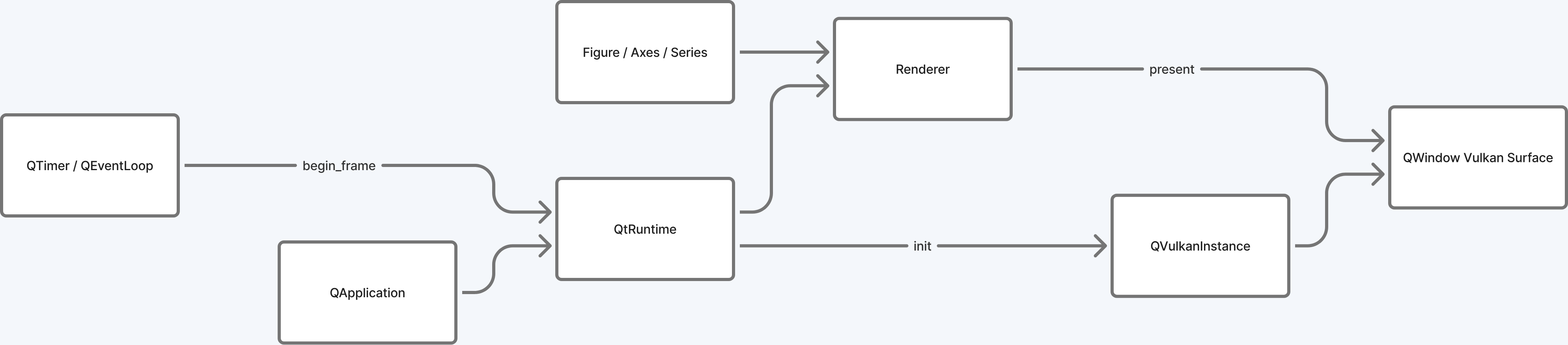
Use Spectra's Vulkan rendering inside a QWindow via the
QtRuntime bootstrap — full plotting power without GLFW or a
separate window.
In-process only — QtRuntime initializes Vulkan and drives frames from the Qt event loop.
SPECTRA_BUILD_EMBED_SHARED=ON and
include/spectra/embed.h.
cmake -B build \
  -DSPECTRA_USE_QT=ON \
  -DSPECTRA_BUILD_QT_EXAMPLE=ON \
  -DCMAKE_BUILD_TYPE=Release
cmake --build build --target qt_embed_demo -j$(nproc)
./build/examples/qt_embed_demo| Flag | Purpose |
|---|---|
SPECTRA_USE_QT | Build the Qt adapter (src/adapters/qt/) |
SPECTRA_BUILD_QT_EXAMPLE | Build qt_embed_demo (requires Qt6) |
#include <QApplication>
#include <QVulkanInstance>
#include <spectra/adapters/qt/qt_runtime.hpp>
#include <spectra/figure.hpp>

int main(int argc, char** argv)
{
    QApplication app(argc, argv);

    spectra::adapters::qt::QtRuntime rt;
    rt.init();                           // VkInstance + VkDevice + Renderer

    // Create a QWindow with surfaceType = Qt::VulkanSurface and
    // assign rt.vulkan_instance() before show().
    QWindow* win = make_vulkan_window(rt);
    win->resize(1280, 800);
    win->show();

    spectra::Figure fig;
    rt.attach_window(win, win->width(), win->height());

    // Drive frames from a timer or QWindow::requestUpdate()
    QObject::connect(&timer, &QTimer::timeout, [&]() {
        rt.begin_frame();
        rt.render_figure(fig);
        rt.end_frame();
    });

    return app.exec();
}
The full working example is in
examples/qt_embed_demo.cpp.
| Method | Purpose |
|---|---|
init() | Create VkInstance, VkDevice, and the shared Renderer. |
vulkan_instance() | Returns the QVulkanInstance* to assign to your QWindow. |
attach_window(QWindow*, w, h) | Create surface + swapchain for a Qt window. |
resize_window(QWindow*, w, h) | Recreate the swapchain on resize. |
begin_frame() / render_figure(Figure&) / end_frame() | Drive a frame from the Qt event loop. |
shutdown() | Tear down all Vulkan resources (idempotent). |
QtSurfaceHost.attach_window() for each.